
Blog
ShapeArray remote monitoring: Top five considerations when using ShapeArray with remote monitoring
29 Sept 2021
ShapeArrayTM's true utility is revealed when it's configured for remote monitoring, especially automated remote monitoring. However, there are several factors to consider when planning a remote monitoring program with ShapeArray.
The top five considerations when using ShapeArray with remote monitoring:
Project site environment
Is the site a large open-air environment with clear lines of site, such as a tailings dam facility (TSF) or highway slope embankment? Or is it in a subsurface, urban environment that is difficult or even hazardous for workers to access? The unique conditions of the project site will help determine if a remote monitoring program is more attractive than a manual one to start, specifically with regards to wired or wireless monitoring solutions and data communication. Expansive, open-air project sites with unobstructed line-of-sight and heavy traffic lend themselves well to wireless remote monitoring systems. Alternatively, tight, confined environments like tunnels or other urban construction sites might be better served with longer wired connections between ShapeArrays and the data acquisition system.
Total sensorized length required
Some understanding of the shear zone location based on geological assessments will help plan your remote monitoring strategy. Longer ShapeArray's have different power requirements than ShapeArray's shorter than 30 meters. Those requirements may come into play depending on what kind of data collection methods you wish to use.

Wired or wireless connectivity
If you think of your home's internet connection—using a Wi-Fi router gives you the convenience of using a laptop or a mobile phone anywhere in the house without the use of wires. However, that convenience can come with a compromise of performance, with users opting to directly connect their desktops to their modem via ethernet cable to make sure their connection speeds are as fast as possible. ShapeArray works in a similar fashion. For the fastest sample rates, clients can opt for wired connections between their instruments and data loggers. For a simpler solution to complex onsite cable management, clients may select wireless data connectivity between their ShapeArray and their data acquisition system. This approach is especially useful on high-traffic sites where hardwired connections can be accidentally damaged by heavy equipment.
Data Acquisition System
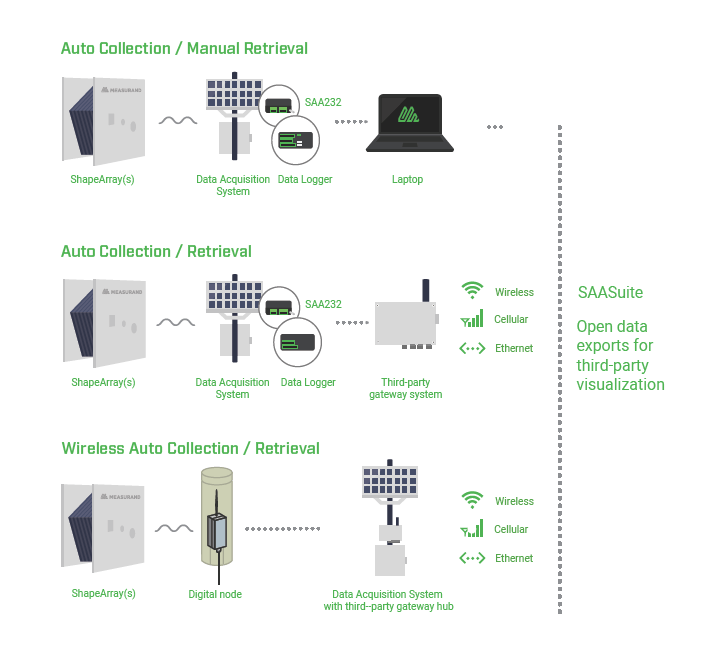
Measurand offers three in-house data acquisition systems (DAS) to help clients get their remote automated deformation monitoring program up and running. For wired remote monitoring, the DAS-1 and DAS-5 house Campbell Scientific data loggers and other components within a weatherproof NEMA 4-rated enclosure for one to five ShapeArrays respectively. These DAS enclosures can either store that ShapeArray data for manual retrieval or can be configured to transmit data via third-party communication solutions.
For wireless remote monitoring, Measurand's DAS-RSTAR combines Campbell Scientific data loggers with RST Instruments' RTU for wireless radio communication with ShapeArrays connected to DT-ShapeArray loggers.
In addition, Measurand also partners with several third-party leaders like sensemetrics, Worldsensing, and Ackcio for flexible wireless remote monitoring. Many of these solutions can be thought of as a digital node and hub—with a digital node communicating data from geotechnical sensors to a centralized hub that sends that data to the cloud via cellular or satellite.
Data Viewing
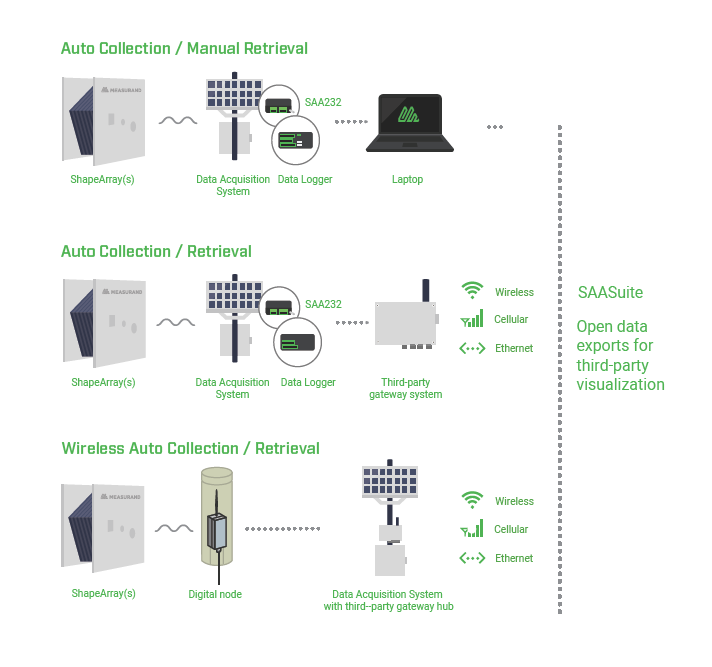
Measurand's software package—SAASuite—bundles all the applications required to install, configure, record, and view ShapeArray data. However, Measurand's open export policy allows clients to integrate their ShapeArray data into workflows that best suit their needs. SAASuite tools enable automated exports to third-party data delivery and viewing software. ShapeArray data is viewable with a number of industry-leading third-party solution providers like Vista Data Vision, Canary, and many, many others.